Help > FAQ > Sound quality in Discord
Show menu names in
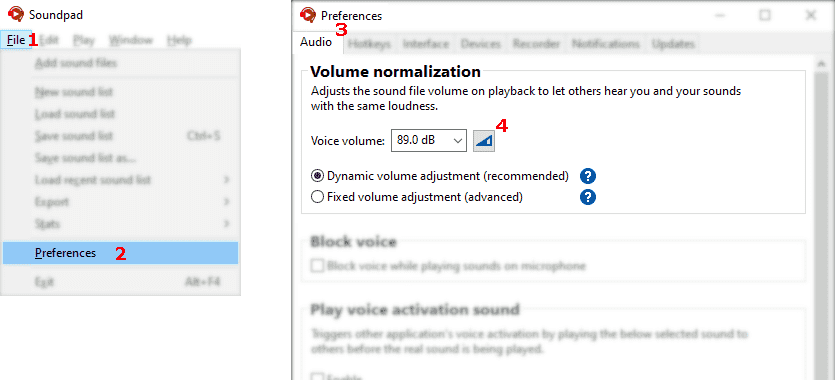
Screenshot showing the instructions
Let Soundpad measure your voice volume
  1. File1 > Preferences2 > Audio3
  2. Click button4
  3. Follow instructions in Soundpad
  4. Click stop button to finish measurement
  5. Apply the changes
The voice volume should be above 74 dB, otherwise certain voice applications may filter out played sounds misinterpreting them as background noise. If your measured voice volume is lower than 74 dB, it is recommended to increase the overall microphone volume in Windows.
Screenshot showing the instructions Screenshot showing the instructions
  1. User Settings1 > Voice & Video2
  2. Choose Custom3 Input Profile and disable
    • Noise Suppression4
    • Echo Cancellation5
  3. Click on Show Advanced Voice Settings6 and disable
    • Automatic Gain Control7
    • Bypass System Audio Input Processing8
  4. Done
Screenshot showing the instructions
There's probably a compatibility issue
  1. File1 > Preferences2 > Devices3
  2. Right-click your microphone > 4
  3. Select a different setup mode5
  4. Click on 6 to verify the result.
Change the setup mode only if you hear absolutely no sound when testing Soundpad in your voice app.