 Soundpad
Help > FAQ >
Sound quality in Discord
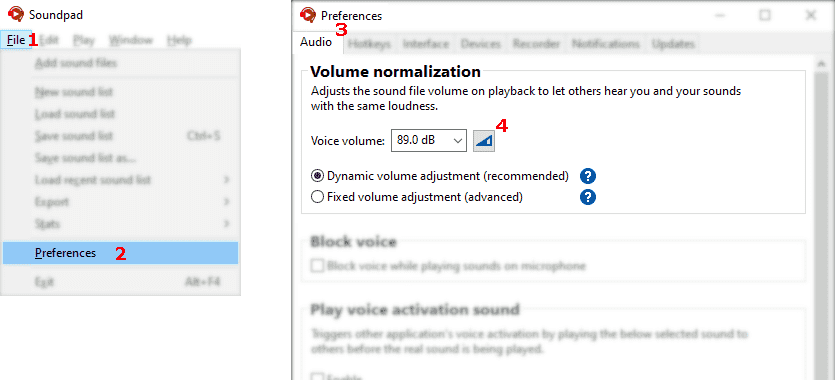


Let Soundpad measure your voice volume
- Файл
1 > Настройки2 > Аудио3 - Click button
4 - Follow instructions in Soundpad
- Click stop button to finish measurement
- Apply the changes
- User Settings
1 > Voice & Video2 -
Choose Custom
3 Input Profile and disable- Noise Suppression
4 - Echo Cancellation
5
- Noise Suppression
-
Click on Show Advanced Voice Settings
6 and disable- Automatic Gain Control
7 - Bypass System Audio Input Processing
8
- Automatic Gain Control
- Done
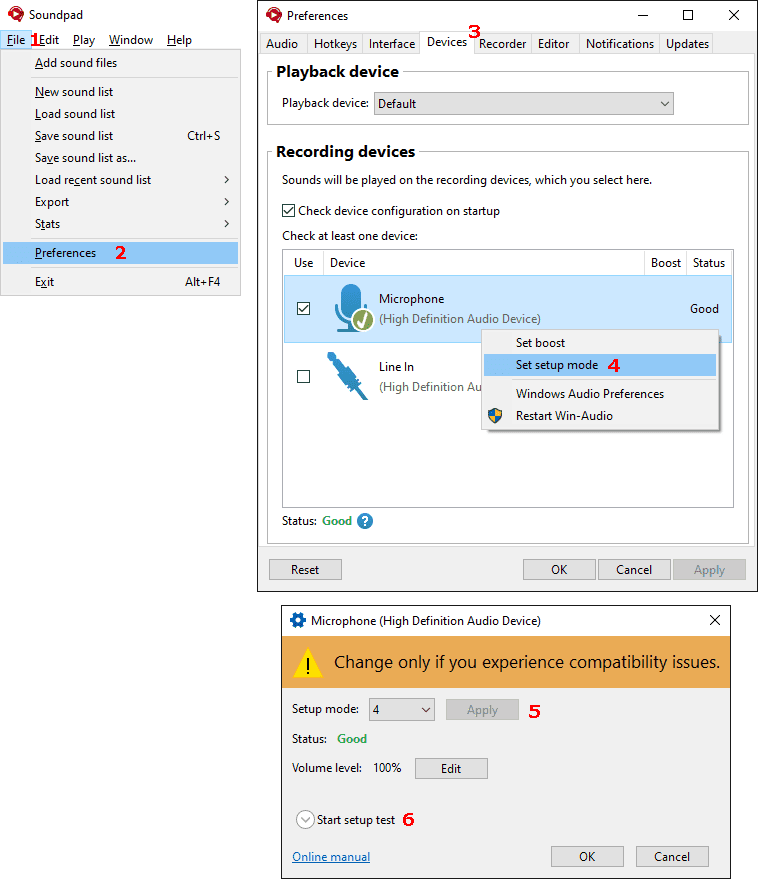
There's probably a compatibility issue
- Файл
1 > Настройки2 > Устройства3 - Right-click your microphone > Задать режим настройки
4 - Select a different setup mode
5 - Click on Начать проверку настройки
6 to verify the result.